
Photographer — solve it right on the sheet.
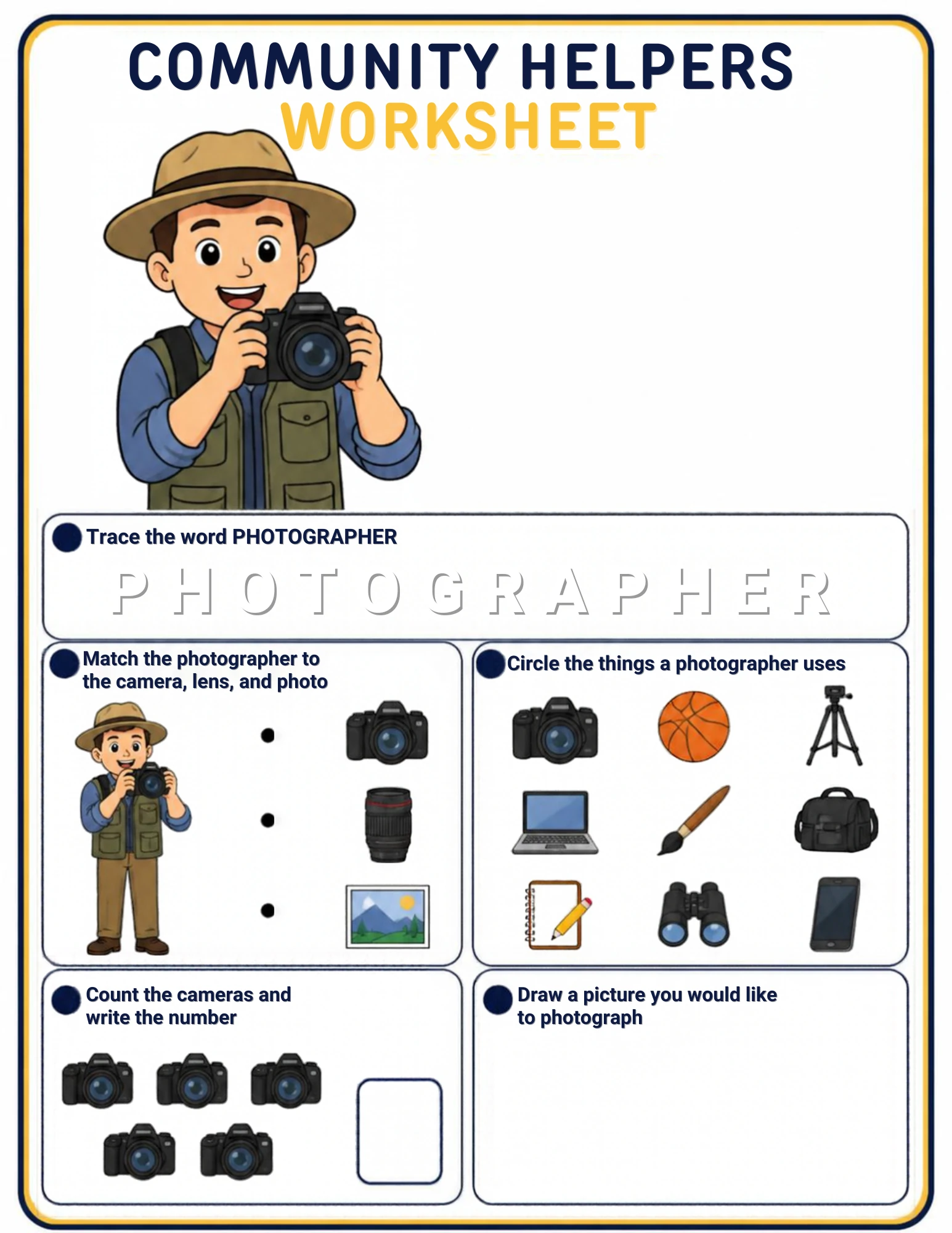
Trace PHOTOGRAPHER, match the photographer to the camera, the lens and the photo, circle the things a photographer uses, count the cameras and draw a picture you would like to photograph.
Your sheet is ready.
Pick a color or the eraser, then trace, match, circle, count and draw straight on the sheet with your finger, a stylus or the mouse. Press Save my work when you are proud — that is what marks this activity cleared for your child.
What this worksheet teaches.
What the child is learning: What a photographer does behind the camera, which tools take, steady and store pictures, and which grid tiles sneak in from other jobs — plus how to write the word PHOTOGRAPHER.
Knowledge to have ready: A photographer captures moments: the camera takes the picture, the lens decides how close it looks, and the photo is the memory you can keep. Tripods hold the camera still, bags carry the gear, and even a phone can be a camera. Two tiles in the grid belong to other jobs entirely — the artist’s paintbrush and the ball game!
Why this activity matters: Photographers freeze time, and children love that power. The nine-tile grid is the set’s biggest sorting challenge — perfect for a child ready to think job by job — and the photograph-draw box turns the sheet into a shot list for a real walk with a real camera.
- Photography vocabulary
- Tool matching
- Job-by-job sorting
- Word tracing
- Counting practice
- Shot-list drawing
What to say before you start: "This is a photographer — the helper who catches moments and keeps them forever. Trace the long name, then connect the camera, the lens and the photo. Now the big grid of nine: which things help take or keep a picture? Two belong to other jobs! Count the cameras, and then draw the photo YOU would take."
What to look for on the sheet: Find the lens and ask what it does — it decides how close and how wide. In the grid, go tile by tile: camera, tripod, laptop, bag, notepad, binoculars, phone — and then the two odd guests. Ask of each: take, keep, steady — or some other job? In the count row, cameras hide behind cameras; count every lens.
Questions to ask along the way: "What does the tripod hold up?" "Which two grid tiles belong to other jobs — and whose jobs are they?" "Could a phone be a camera too?" "What moment would YOU freeze forever?"
Helpful hints without giving it away: Go tile by tile with the photographer’s question: does this help take a picture, keep a picture, or hold the camera still? Then hunt for the two tiles that paint or bounce instead — they wandered in from an artist’s table and a ball game.
Parent tips: Hand over a real camera — an old phone is perfect — and give the drawn shot list a test walk: one picture of a pet, one of a person, one of something tiny. Ask your child to pick ONE favorite and say why; that is a photographer’s eye, born.
Understanding check: Ask: "Who takes pictures for a living? Name two photographer tools from the grid. Which tiles belong to other jobs?" The photographer, two tools, the two odd ones = the sheet landed.
Real-life practice: On your next walk, let your child be the family photographer with ten pictures of anything. Print or display one photo and let them caption it — a real photo, a real title, a real gallery debut.
This activity belongs to Class 33 — Community Helpers & Our Neighborhood on the Learning Path. Progress is saved on this device for the child chosen in My Classroom — and only a real save of finished work marks it cleared, never just opening the page.
How did it go?
One tap, no writing, no name. Pick the face that matches how it went — reactions are counted instantly and stay anonymous.
Parent reviews.
A different thing from the quick faces above: a star rating for the grown-ups, plus an optional line about how it went. Every review is read by the school office before it appears.
No parent reviews yet — yours could be the first.
Parent comments.
How did you use this page Share the game, the moment or the trick that worked in your house. Comments are read by the school office before they appear, and they are about your ideas — never about your child.
No parent comments yet — yours could be the first.